Building an Enterprise Sandbox for AI Agents
We tried to buy the sandbox. We ended up building one. This is the story of why, what we built, and what broke.
Enterprise agents do not just answer questions. They execute workflows across codebases, warehouses, object stores, DAGs, and cloud infrastructure.
They need a real computer: shell, Python, packages, long jobs, files, cloud APIs, and sometimes GPUs.
The enterprise buying question is different:
Can it run code inside our cloud without touching production, leaking credentials, or exfiltrating data?
A system prompt is not a control. A permission prompt is not a boundary. “The model should not do that” is not an answer.
We tried to buy the sandbox. We ended up building one.
This is the story of why, what we built, and what broke.
A sandbox is not one thing
Luis Cardoso’s field guide to AI sandboxes has the cleanest framing: a sandbox is not one thing. It is boundary, policy, and lifecycle.
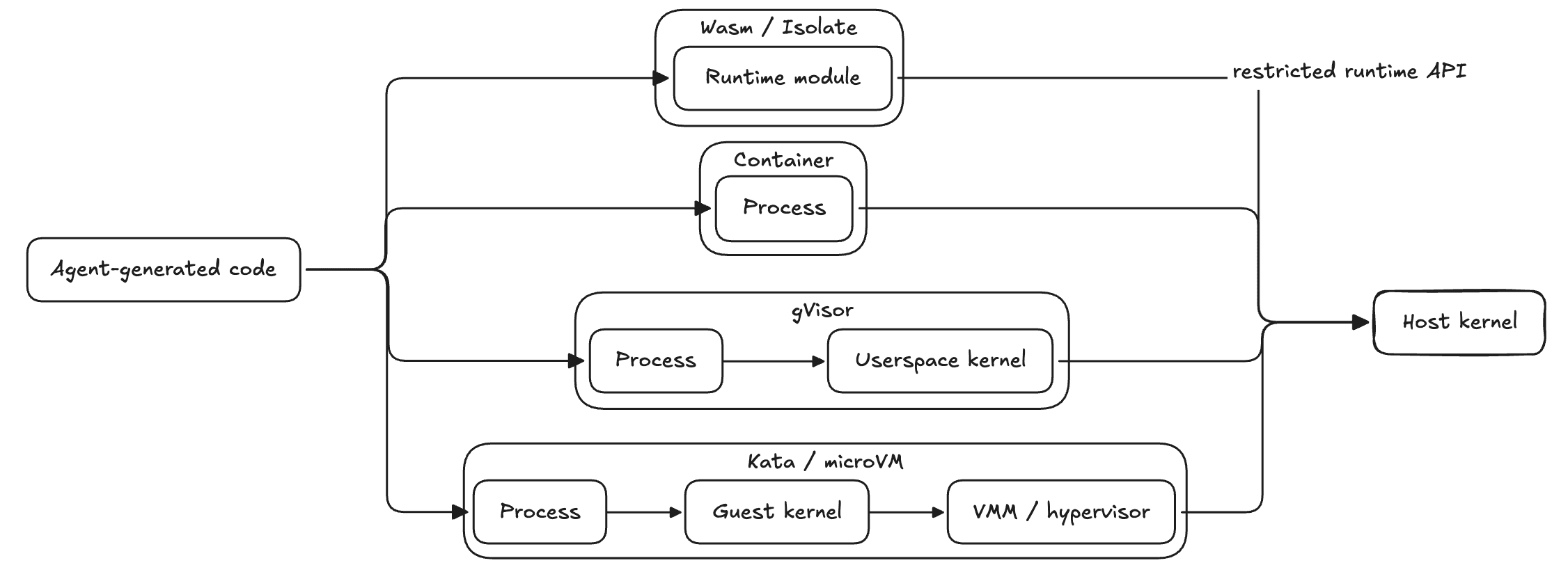
Boundary is where isolation is enforced. Containers use namespaces and cgroups but share the host kernel. gVisor is not a microVM; it is a userspace kernel that intercepts syscalls before they reach the host kernel. Kata and microVMs run the workload behind a guest kernel and hypervisor. Wasm and isolates restrict code at the runtime layer.
Policy is what code can touch: files, domains, APIs, CPU, memory, GPU, and write destinations.
Lifecycle is how the environment starts, persists, resumes, cleans up, and fails.
A strong boundary with a sloppy policy still leaks data. A tight policy on a weak boundary still has kernel-escape risk. You need both.
Part I, The buy survey, and why it failed
We surveyed E2B, Runloop, Daytona, Claude Code, Vercel Sandbox, Fly.io Sprites, Kubernetes Agent Sandbox, and local sandbox runtimes.
The problem was not that these systems were bad. The problem was our happy path.
We needed:
- execution inside the customer’s cloud or VPC
- resource-level write policy: repo, branch, bucket, dataset, DAG, domain, GPU type
- credentials outside the worker, even when tools need auth
- long-running jobs, not just snippets
- persistent workspaces
- package installs and compilation
- portability across GCP, AWS, and Azure
- a GPU path
Most sandbox products optimize for “run code safely in the provider’s environment.” We needed a deployable execution plane inside the customer’s environment, with hooks for VPC placement, credential boundaries, service-level policy, and auditability.
That was the build-vs-buy line.
Part II, Why containers first, despite stronger boundaries
For hostile code, the strongest practical boundary is usually a VM-style boundary: Kata, a microVM, or a similar guest-kernel/hypervisor model.
gVisor sits in the middle. It is stronger than vanilla runc because syscalls hit a userspace kernel first. It is not the same boundary as a guest kernel behind a hypervisor.
We still started with Kubernetes containers.
Not because containers are ideal. They share the host kernel. A kernel escape is a real risk.
We chose containers because v1 had to work across:
- hosted multi-tenant
- hosted single-tenant
- BYOC single-tenant in a customer VPC
- GCP, AWS, and Azure over time
There is no single managed “strong sandbox” primitive across clouds.
GKE Sandbox uses gVisor. AKS Pod Sandboxing uses Kata. AWS Fargate gives VM-isolated serverless pods, but through Fargate profiles, not RuntimeClass, and without GPU support.
If we chose “microVM everywhere” on day one, we would own multiple runtime stories, provisioning paths, and GPU exceptions before proving the product.
So v1 used hardened containers, with policy treated as infrastructure:
- non-root containers
- dropped Linux capabilities
- no privilege escalation
- seccomp defaults
- resource limits and timeouts
- default-deny egress
- no long-lived credentials in workers
- team-scoped workspaces
- auditable service proxies
The upgrade seam is the execution API:
assign(task_id, team_id) -> session
exec(session, command, cwd, env, timeout) -> result
stream(session, command, cwd, env) -> events
cancel(session, call_id) -> status
release(session) -> status
The backend can change later: runc today, gVisor or Kata where available, per-task pods, or microVMs where the threat model demands it.
Part III, The internal architecture
Architecture Diagram
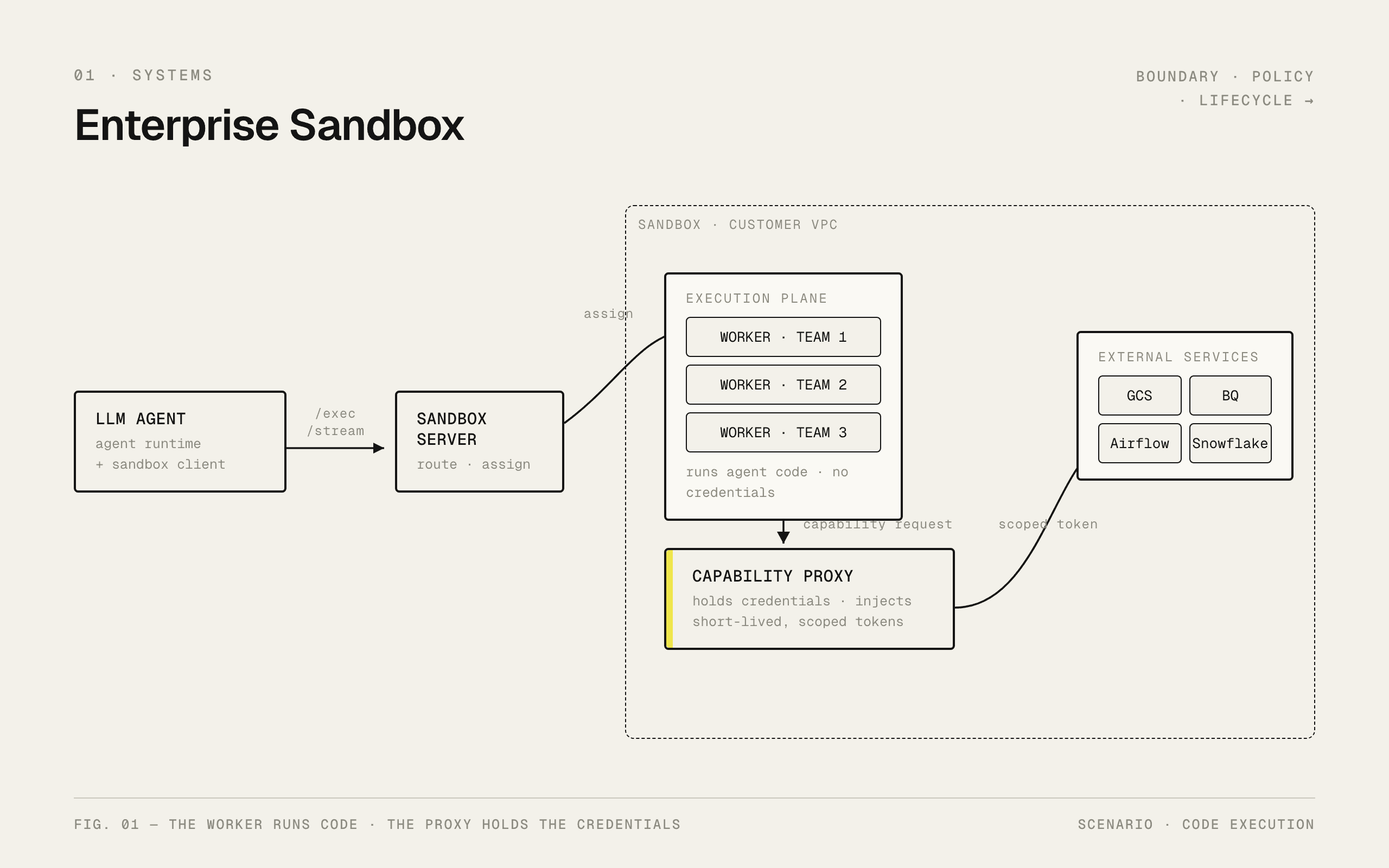
Worker pod and capability-proxy pods are separated to make sure that worker can never directly access credentials or execute commands on the critical services such as Airflow/BQ etc. Policy proxy takes the LLM generated command as input and then checks for any rule violation if not, it executes the command on the service. Squid Proxy acts as the HTTP/HTTPS proxy layer and only lets allowed traffic go through.
The system has two planes.
The control plane owns tasks, workflows, state, and routing.
The execution plane owns code execution, workspace files, network egress, and external capabilities.
The worker executes code. The proxy uses credentials. They are separate.
The agent can ask to clone a repo, query a warehouse, upload an artifact, trigger a DAG, or install a package. It does not receive raw credentials to do those things directly.
Execution identity is not DB identity
A request has two identities.
One identity controls what rows the user can see in the application database.
Another controls where the user’s code runs and which workspace/policy it gets.
Example: two teams may belong to the same enterprise customer. They share a tenant, but they should not share the same execution workspace or write policy.
So we keep them separate:
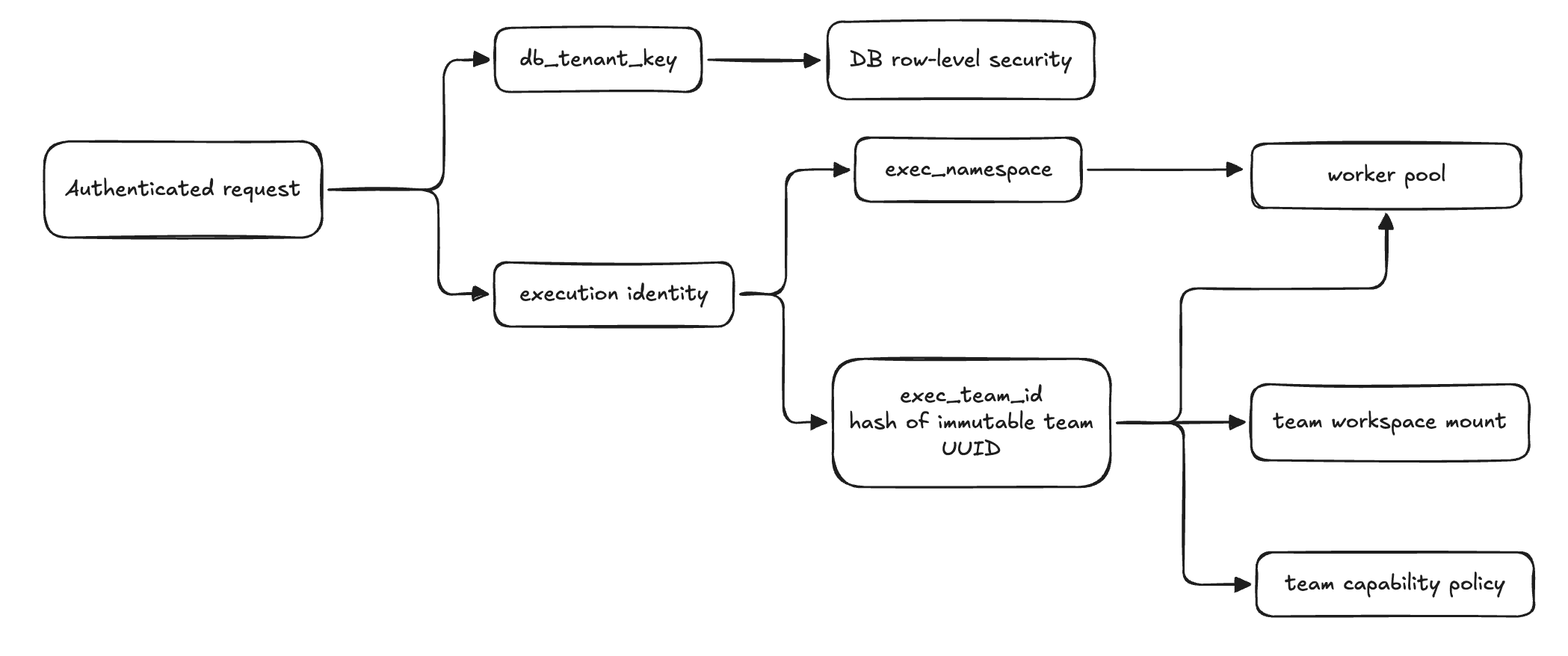
db_tenant_key: application/database isolationexec_namespace: execution locationexec_team_id: stable ID for the team’s worker pool, workspace, and policy
exec_team_id comes from the immutable team UUID, not the team name. Team names change. Routing keys should not.
Read broadly, write narrowly
Agents need context. If you over-constrain reads, they become useless. Writes mutate reality.
So the policy is:
Read broadly. Write narrowly. Audit both.
Examples:
- Git: clone/pull approved repos; push only to approved branches; block force-push unless explicitly allowed.
- Warehouses: query approved projects/datasets; writes require scoped credentials.
- Object storage: read approved paths; write artifacts only to task-scoped prefixes.
- Airflow/Composer: trigger approved DAGs; do not mutate the environment.
- HTTP: allow package registries and approved domains; block metadata endpoints, private ranges, and arbitrary destinations.
A simplified policy row looks like:
team_capabilities
  exec_team_id
  github_enabled
  github_allowed_repos
  github_allowed_branches
  http_proxy_enabled
  http_allowed_domains
  http_blocked_domains
  gcp_allowed_projects
  gcp_allowed_buckets
  gpu_enabled
  gpu_allowed_types
  gpu_max_timeout_seconds
How a command becomes a policy decision
The agent’s tools, gcloud, bq, kubectl, are pointed at the capability proxy, not at the real cloud endpoints. So the proxy never parses a shell string. It inspects the API call the tool actually makes: host, method, path, and request body.
Policy is a set of ordered deny rules and resource constraints. A few real ones:
block  DELETE *.googleapis.com/**        # infra is not deleted from inside the sandbox
block  POST bigquery .../jobs  when SQL matches  DROP TABLE | TRUNCATE | ALTER ... DROP
allow  writes only to approved buckets/projects
check  kubernetes verb against an allowlist (get, list, ...)
The decision is data, host, method, path, body, resource, not a regex over a command line.
Guardrails are not boundaries. The DROP TABLE rule above is trivially defeated with comments, dynamic SQL, or a different encoding. String-level rules catch mistakes. The hard boundary is the credential: the token the proxy injects carries query and job-run permissions only, so a destructive statement fails because IAM never granted it.
Network allowlists help, but they are not enough. IPs change. CDNs exist. Tools make surprising calls. Metadata endpoints and private ranges need hard denies. High-risk operations need the request-level policy above, not just domain filters.
Persistent workspace
The worker pod is compute. The workspace is state.
Agents install packages, create intermediate files, generate artifacts, run notebooks, and resume work. Rebuilding the environment on every tool call is slow and brittle.
We used a shared ReadWriteMany volume for team workspaces. Each team’s worker pool mounts only its subtree. Tasks get their own directories and virtual environments.
This gave us persistent files, package caches, resumable tasks, stable artifact paths, and movable compute.
It also introduced startup latency, ownership problems, cleanup, quotas, and noisy-neighbor risks. Those risks showed up quickly.
Routing, stickiness, and backpressure
Sandbox-server assigns a task to a worker and keeps it there for the task lifetime. Assignment state lives in Redis, and assign/release operations are atomic, so two concurrent tasks cannot both claim the last slot. When every pod is at capacity, the server returns a retryable 429 instead of overloading a pod into an OOM.
Capacity exhaustion is a product state, not a stack trace.
There was one useful simplification: we originally planned consistent hashing to pin tasks to pods. But because every worker mounts the same shared workspace volume, any pod can serve any task’s files. Sticky assignment for the duration of a task was enough. If we later depend on pod-local state like /tmp or in-memory caches, that changes.
Part IV, Incidents that shaped the system
Incident 1: credentials do not belong in the sandbox
The first version of any agent execution system tends to put secrets where code can see them.
That works until the agent runs:
cat $GOOGLE_APPLICATION_CREDENTIALS
printenv
find /tmp -type f -maxdepth 3 -print
Generated code is code. If a service account JSON file or long-lived token is present in the worker filesystem or environment, the agent can read it.
This showed up with cloud access. The agent needed tools like bq, gsutil, Git, and Python SDK clients. The naive path was to materialize credentials into the worker. That made tools work and exposed credential material.
We changed the model.
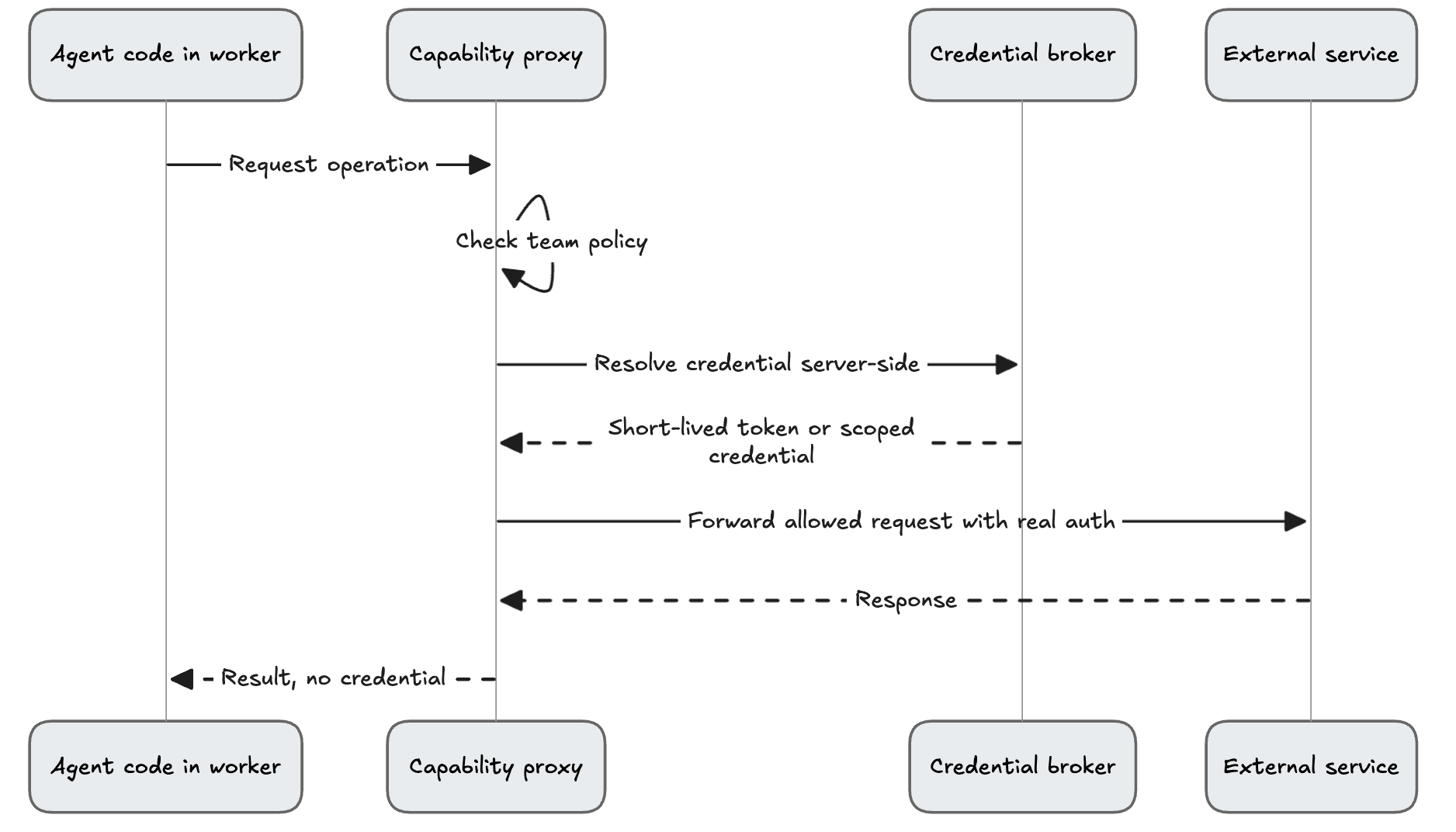
The worker asks for capabilities. The proxy owns credentials.
For artifact sync, the control plane mints a short-lived token and injects it into one hardened upload/download process. The process runs with a clean environment and isolated Python mode. The LLM is not running at that moment. When the process exits, the token is gone.
Bad pattern:
Worker has long-lived cloud credential.
Agent can inspect env/files.
Credential can leak.
Better pattern:
Worker asks proxy for operation.
Proxy owns credential and policy.
Agent gets result, not secret.
Incident 2: the Git wrapper was the wrong control point
Our first Git control point was a wrapper around the git binary. It intercepted common commands and routed them through the capability proxy.
It worked in demos.
Then real workflows arrived.
Git commands get chained. Libraries shell out in unexpected ways. Subprocesses bypass PATH. Some Git behavior depends on binary name and invocation shape. A wrapper is easy to demo and easy to bypass by accident.
The control point belongs server-side, not in the binary. Today the wrapper’s only job is to hand the operation to the capability proxy. The proxy holds the real token, injects it, runs the Git operation itself, and enforces repo, branch, and force-push policy. The agent never sees a credential.
We are still pushing the interception further down: having Git speak smart HTTP through the proxy directly, so we stop depending on a wrapper sitting in PATH at all. Anything that depends on “our wrapper is the program that runs” eventually loses to a library, a subprocess, a shell edge case, or a user workaround.
Incident 3: shared storage made startup slow
Persistent workspaces were required. So we used a shared RWX filesystem.
Then worker startup regressed.
Kubernetes events showed volume ownership setup processing tens of thousands of files. The root cause was fsGroup on a shared network filesystem. On pod startup, kubelet tried to ensure group ownership across the mounted volume. On a shared workspace, that meant scanning far more files than the task needed.
As task files accumulated, startup got slower.
The fix was unglamorous: stop walking the whole volume. We made ownership setup non-recursive, an init container fixes only the workspace root directory, not every file under it, and set fsGroupChangePolicy: OnRootMismatch so the kubelet stops re-chowning the shared volume on every pod start. Startup time stopped scaling with the number of files on the volume, and we added an explicit time-to-ready check so the regression could not sneak back.
If the workspace persists, you need an ownership model, cleanup model, quota model, and startup-latency model. Otherwise the filesystem becomes a hidden scheduler.
Incident 4: Kubernetes exec was the wrong transport
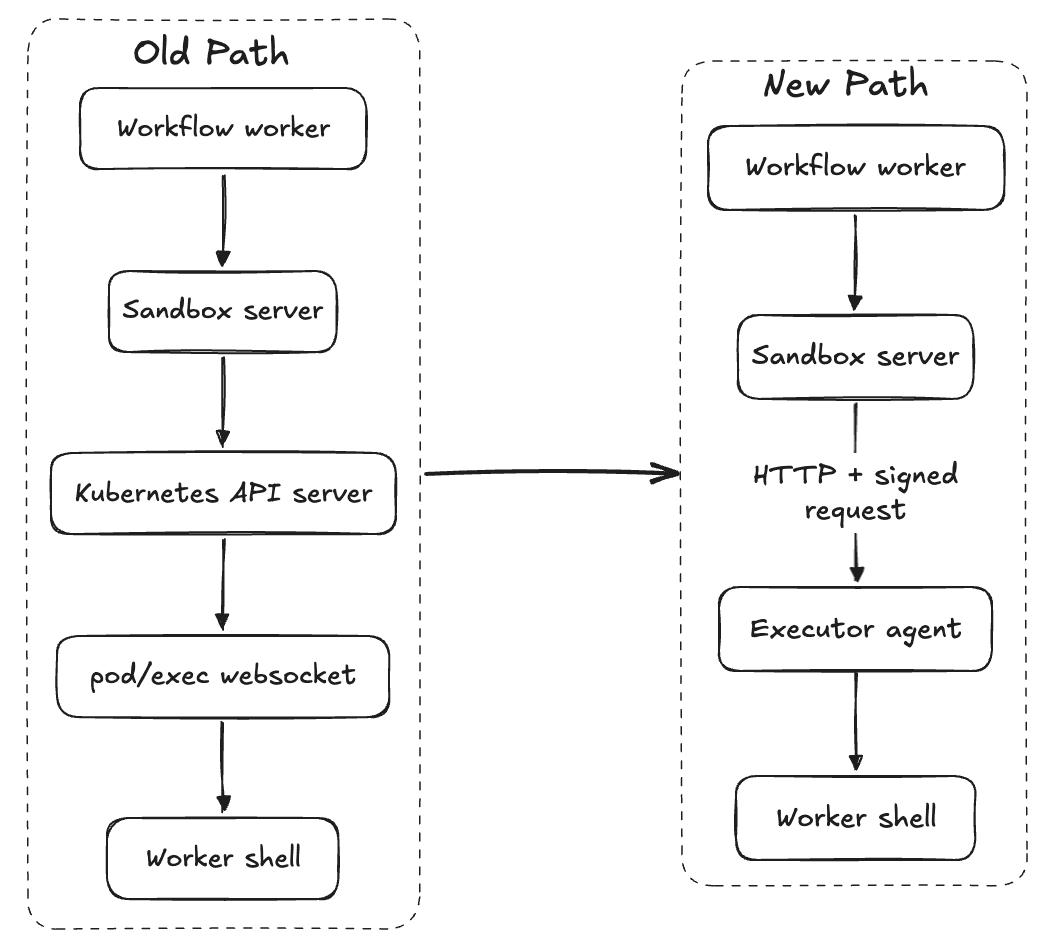
The early execution path used Kubernetes pod/exec.
It was convenient. It let the control plane run a command inside a worker pod without adding another service.
Then we hit the usual problems: websocket quirks, streaming edge cases, timeouts, cancellation, long-running silent commands, and API-server dependency for every command.
pod/exec is a useful debugging primitive. It is not a durable job transport for an agent runtime.
We moved toward an executor-agent model. Each worker exposes a small HTTP API:
/exec/stream/cancel- health checks
- file operations
Sandbox-server still owns routing, capacity, auth, and policy context. It calls the worker over HTTP with signed requests instead of using Kubernetes exec streams.
Incident 5: public docs and metrics are not harmless
One security review found that internal service docs and metrics were reachable from outside.
The cause was boring:
- framework docs were enabled by default
/metricswas exempt from HMAC auth so Prometheus could scrape it- ingress exposed the route too
The first attempted fix was at the ingress layer. It depended on an ingress snippet directive. That directive was disabled at the controller level. The rule looked present and did nothing.
The real fix moved enforcement into the application, where behavior could be tested.
Critical security checks should live where they can be tested. Platform-level controls can silently fail open when the platform is configured differently than you think.
Smaller fixes, sharper lessons
A few smaller bugs taught the same pattern:
- Path traversal: never concatenate team/user identifiers into filesystem paths without canonicalizing and checking containment.
- Atomic credential writes: write sensitive state to a staging directory, then swap it into place. Never leave half-written credentials as current.
- Blocking I/O in async handlers: one synchronous HTTP call in an async proxy can serialize unrelated requests.
- Credential janitors: missing metadata is not proof that credentials are stale.
- Readiness probes: a five-second probe for an eighty-second startup turns healthy pods into crash loops.
None of these are visible in a demo. All of them matter in production.
Part V, Roadmap
Stronger runtime profiles
Containers got us to a portable v1. They are not the final boundary for every workload.
Today the sandbox is CPU-first: GPU work is dispatched to a separate compute backend, which keeps the sandbox simple but adds data-transfer latency. Self-hosted GPU pools are the next step.
The next step is runtime profiles: containers for lower-risk or single-tenant workloads, gVisor where syscall interposition is enough, Kata where cloud support is clean, and microVMs where hostile-code isolation dominates.
Per-task or per-session pods
Team pools are practical. Per-task pods improve cleanup, isolation, and reproducibility. Warm pools can hide much of the startup cost.
A more generic capability layer
Service-specific proxies work, but they do not scale linearly. Each new service is a credential store, a TTL janitor, an interception path, policy logic, and more per-customer config. The end state is one policy model for credential injection, allow/deny decisions, rate limits, audit logs, and resource-level write control.
Productized team budgets
Teams should have explicit budgets: CPU, memory, parallel tasks, GPU type, GPU concurrency, allowed domains, allowed repos, and write destinations. Capacity exhaustion should be a product state, not an opaque failure.
Browser mode
Many enterprise workflows require websites, not just APIs. Browser execution needs the same model: controlled network, credential injection, session isolation, and audit logs.
Build support outside the sandbox
Agents will eventually need to build deployable services. Docker-in-Docker inside the worker is the wrong default. A dedicated build service using BuildKit, Kaniko, Tekton, Cloud Build, or customer-native build infrastructure is safer.
Better policy UX
Security teams should be able to see and edit what the sandbox can do: domains, repos, branches, datasets, buckets, DAGs, GPU limits, and rate limits. YAML hidden in a repo is not enough.
References
- Luis Cardoso, A field guide to sandboxes for AI
- Anthropic, Beyond permission prompts: making Claude Code more secure and autonomous
- Claude Code docs, Configure the sandboxed Bash tool
- Google Cloud, Harden workload isolation with GKE Sandbox
- Kubernetes, Running Agents on Kubernetes with Agent Sandbox
- Microsoft, AKS Pod Sandboxing
- Kubernetes, RuntimeClass
- AWS, Amazon EKS on AWS Fargate
- E2B, BYOC documentation
- Runloop, Protect API Keys with Agent Gateway
- Emergent, Real Environments for AI Agents: Why We Bet on Kubernetes
- Fly.io, The Design & Implementation of Sprites